


Key Takeaways
- AI workflows are ideal for predictable, rule-based business processes.
- AI agents enable dynamic reasoning, planning, and intelligent decision-making.
- Hybrid AI architectures combine AI workflows and AI agents for maximum efficiency.
- Choosing the right AI architecture improves scalability, performance, and cost efficiency.
- MeisterIT Systems builds secure, scalable AI workflows, AI agents, and enterprise AI solutions.
Introduction
AI agents and AI workflows are often treated as the same thing, but they solve very different problems. An AI workflow follows predefined steps to automate predictable tasks, while an AI agent evaluates context, makes decisions, and determines the next action to achieve a goal.
Choosing the wrong architecture doesn’t just increase implementation complexity. It can lead to higher infrastructure costs, unpredictable behavior, unnecessary latency, and systems that become difficult to debug as they scale.
As enterprise AI adoption accelerates, engineering teams need to understand where each approach delivers the most value. This guide explains the differences between AI agents and AI workflows, compares their capabilities, explores real-world use cases, and helps you decide which architecture best fits your application.
What are AI Workflows?
AI workflow is a sequence of steps defined in code. You decide the order, the branches, and the conditions. The LLM gets called at specific points to do one job, like classifying text or drafting a response, then control passes back to your code.
Think of it like a flowchart with an AI step or two inside it. The path is fixed. The outcome is predictable, because you wrote the rules.
Anthropic‘s own engineering research describes five common workflow patterns worth knowing:
- Prompt chaining, where one LLM call’s output feeds directly into the next step
- Routing, where an early step classifies the input and sends it down the right path
- Parallelization, where multiple LLM calls run at once and get combined
- Orchestrator-workers, where a central step breaks a task into pieces and assigns them out
- Evaluator-optimizer, where one call generates a draft and another checks it before it ships
A real example: a support ticket pipeline that uses an LLM to classify intent, routes billing questions to one queue and bugs to another, then drafts a first response for a human to review. Every step is known in advance. Tools like AWS Step Functions, Temporal, n8n, and Make all run on this same logic, with or without an LLM in the mix.
What are AI Agents?
An AI agent is a system where the LLM decides what happens next, not your code. It picks a tool, looks at the result, decides if the goal is met, and either stops or tries something else. This loop is what people mean when they say “agentic AI” or “autonomous AI agents”.
The key difference from a workflow is who owns control flow. In a workflow, your code owns it. In an agent, the model owns it, working inside the boundaries and tools you’ve given it.
A real example: A coding agent like Claude Code or Cursor’s agent mode reads a codebase, decides which files to open, runs the test suite, reads the failure, edits the code, and reruns the tests. Nobody scripted that exact sequence. The agent figured it out by checking its own progress against the test results at each step, what Anthropic calls “ground truth” from the environment.
Agents need this kind of verifiable feedback to work well. Without a clear way to check progress, like passing tests, a successful API call, or a human checkpoint, an agent can wander or confidently produce the wrong answer.
AI Agents vs AI Workflows: Key Differences
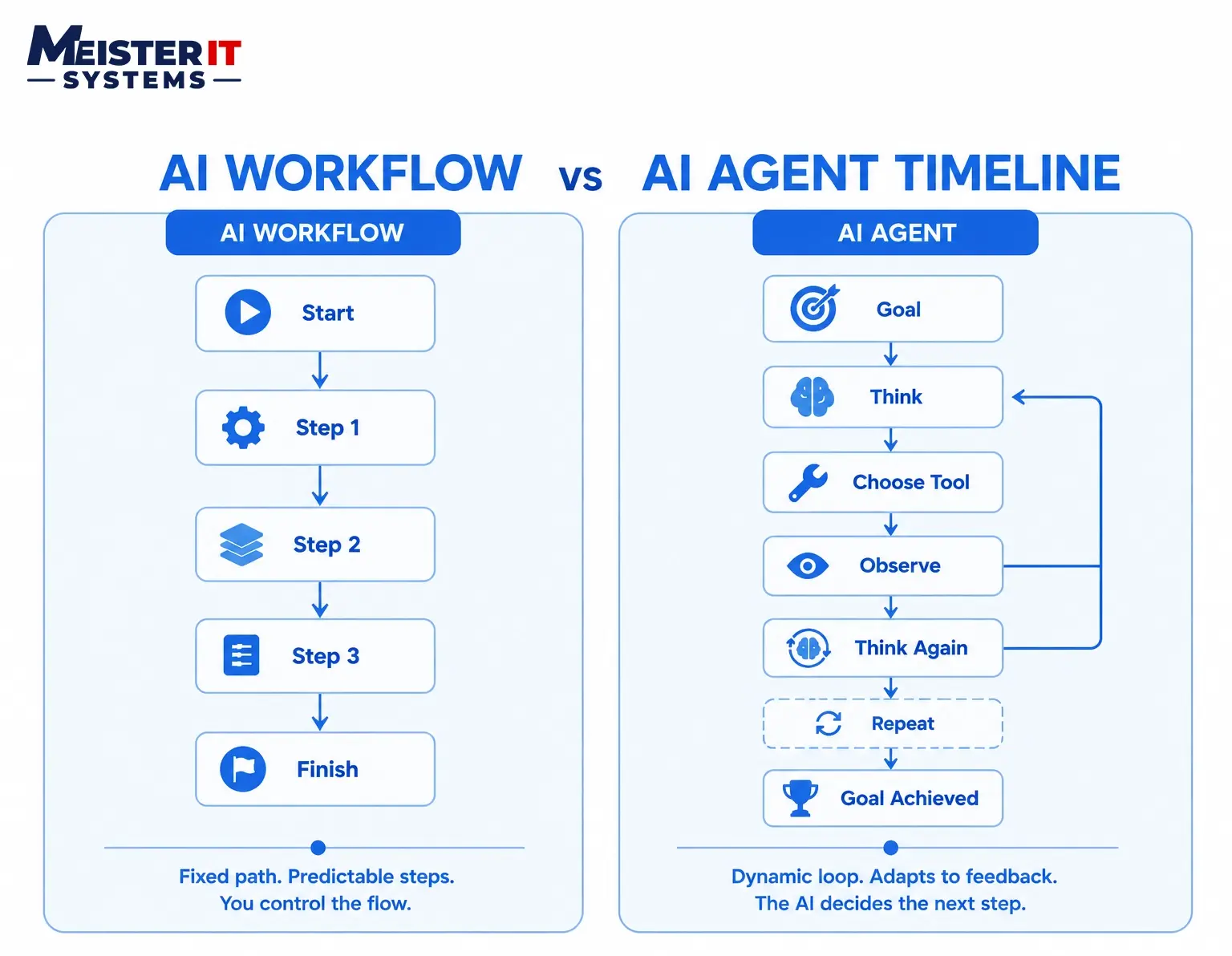
The split comes down to who makes the decisions and how much that costs you in return.
- Control flow: Workflows follow code you wrote. Agents follow a loop the model manages itself.
- Predictability: Workflows behave the same way every run. Agents can take a different path each time, even on the same input.
- Cost per task: Workflows usually make one or two LLM calls. Agents can make dozens, especially when they retry or second-guess themselves.
- Failure mode: A workflow fails at a known step, and you can see exactly where. An agent can compound a small early mistake across several turns before anyone notices.
- Debugging: Workflow bugs are easy to trace because the path is fixed. Agent bugs require tracing decisions, not just code, since runs aren’t deterministic between attempts.
- Best fit: Workflows suit tasks you can fully describe in advance. Agents suit tasks where the steps depend on what the system discovers along the way.
AI Agents vs AI Workflows at a Glance
| AI Workflow | AI Agent |
|---|---|
| Executes predefined steps | Works toward a goal |
| Code controls execution | LLM controls execution |
| Predictable outputs | Adaptive outputs |
| Low latency | Higher latency |
| Lower operational cost | Higher operational cost |
| Easier to debug | Requires observability |
| Best for repetitive automation | Best for dynamic decision-making |
AI Agents vs AI Workflows: Feature Comparison
| Feature | AI Workflows | AI Agents |
|---|---|---|
| Who controls the steps | Your code | The LLM, in a loop |
| Predictability | High, same path every time | Variable, path depends on results |
| Cost per execution | Low, fixed number of calls | Higher, scales with loop length |
| Latency | Fast, no back-and-forth | Slower, multiple reasoning passes |
| Debugging | Straightforward, fixed trace | Harder, needs decision-level tracing |
| Setup complexity | Lower, standard pipeline tools | Higher, needs guardrails and evals |
| Handles ambiguity | Poorly, needs explicit rules | Well, model adapts to context |
| Audit and compliance fit | Strong, every step is logged the same way | Needs extra work to log decisions clearly |
| Typical tools | n8n, Make, Temporal, AWS Step Functions | Claude Agent SDK, LangGraph, CrewAI |
| Memory | Minimal | Short and long-term memory |
| Planning | Fixed | Dynamic planning |
| Learning | None | Can adapt using feedback |
| Human Approval | Usually predefined | Often optional |
| Tool Calling | Fixed integrations | Dynamic tool selection |
| Scalability | High | Depends on complexity |
| Maintenance | Easier | Higher operational effort |
When Should You Use AI Workflows?
Reach for a workflow when you can actually write down every step before you build anything.
- The process is repeatable. Invoice processing, lead enrichment, data syncing between systems, and ticket triage all have a known shape.
- Compliance matters. Regulated industries need to show the same input produces the same handling every time. Workflows give you that by default.
- Volume is high, and per-task cost needs to stay low. A workflow making one LLM call per record is far cheaper at scale than an agent looping through tool calls.
- You need to debug fast. When something breaks, you want to know exactly which step failed, not reconstruct a chain of model decisions.
If you can draw the process as a flowchart and you’re confident it won’t change shape based on edge cases, build a workflow.
AI workflows are ideal when reliability, consistency, and operational efficiency matter more than autonomous reasoning. They work best for business processes with clearly defined inputs, outputs, and decision rules.
Common enterprise examples include invoice approval, employee onboarding, CRM synchronization, document processing, compliance reporting, ETL pipelines, and scheduled notifications. Since every execution follows the same path, workflows are easier to monitor, audit, and optimize over time.
When Should You Use AI Agents?
Choose AI agents when the execution path depends on context rather than predefined rules. Unlike AI workflows, agents can evaluate information, make decisions, and determine the next action based on changing conditions.
AI agents are the right choice when:
- The next step cannot be predetermined.
- Tasks require reasoning, planning, and decision-making.
- Multiple tools or systems need to be accessed dynamically.
- The environment changes throughout execution.
- The outcome depends on information discovered during the task.
Common enterprise use cases include:
- Software engineering assistants
- IT incident response and troubleshooting
- AI research assistants
- Cybersecurity investigations
- Customer support automation
- Financial analysis and reporting
- Autonomous business operations
Before implementing AI agents, ensure there is a reliable way to evaluate their progress such as test results, API responses, business rules, or human approval. Without clear feedback, agents can make incorrect decisions and continue executing without achieving the intended goal.
Can AI Agents and AI Workflows Work Together?
Yes. Most production-grade AI systems combine AI workflows and AI agents rather than relying on one approach alone. Anthropic also recommends starting with the simplest workflow that solves the problem and introducing AI agents only where additional flexibility provides measurable value.
A typical hybrid architecture works like this:
- AI workflows manage predictable, rule-based processes and business logic.
- AI agents handle complex tasks that require reasoning, planning, and dynamic decision-making.
- Workflows invoke agents only when a task cannot be completed using predefined rules.
- Governance and approvals remain within the workflow, while agents focus on solving ambiguous problems.
Example: E-commerce Returns
- A workflow automatically approves standard returns based on predefined policies.
- If a return involves fraud, policy exceptions, or missing information, the workflow passes the request to an AI agent.
- The AI agent analyzes order history, policy documents, and available tools before recommending or completing the next action.
Benefits of a Hybrid Approach
- Improves reliability and consistency.
- Reduces infrastructure and operational costs.
- Limits autonomous behavior to tasks that truly require it.
- Makes systems easier to monitor, debug, and maintain.
- Balances predictable automation with intelligent decision-making.
Cost and Performance Considerations
AI workflows generally require fewer model calls, making them less expensive to operate and easier to scale. Their predictable execution also reduces latency and simplifies infrastructure planning.
AI agents typically perform multiple reasoning cycles, tool calls, and validation steps before completing a task. While this increases operational costs and response times, it enables the system to solve more complex and dynamic problems that cannot be handled through predefined workflows alone.
Before selecting an architecture, estimate expected token usage, API calls, execution latency, infrastructure requirements, monitoring overhead, and evaluation costs.
Common Mistakes When Choosing Between AI Agents and AI Workflows
Most of the pain we see comes from skipping the analysis and jumping straight to a build.
- Building an agent when a workflow would do. Teams reach for “agentic” because it sounds more advanced, then pay for unpredictable runs on a task that had five fixed steps the whole time.
- Forcing a workflow onto a problem that needs judgment. The opposite mistake. Rigid pipelines on ambiguous tasks turn into a pile of manual overrides and exceptions nobody maintains.
- No budget caps on agent loops. Without a hard limit on turns, tokens, or time, an agent stuck in a retry loop can burn through cost fast with nothing to show for it.
- Treating “agentic” as a feature checkbox. Marketing pressure pushes teams to say they shipped an AI agent, even when a simpler workflow with a single well-placed LLM call would have served customers better.
- No observability into agent decisions. Standard logging tells you what a workflow did. It won’t tell you why an agent chose one tool over another, which makes failures nearly impossible to diagnose after the fact.
How to Choose Between AI Agents and AI Workflows
Run through this before writing any code.
- Map every step. If you can list each decision point and its possible outcomes, you likely need a workflow, not an agent.
- Check your tolerance for variability. Can the system take a different path on the same input and still be acceptable? If not, that’s a workflow signal.
- Calculate cost per execution at your real volume. Multiply expected LLM calls by your monthly volume for both approaches. The gap is often bigger than people expect.
- Confirm your compliance and audit needs. Regulated workflows almost always favor the predictable, code-controlled path.
- Start narrow. Build the simplest version that passes evaluation, whether that’s a single LLM call, a short workflow, or one well-tooled agent. Add complexity only when you can point to a measurable gain from it.
AI Agents vs AI Workflows: Decision Matrix
Choosing between an AI workflow, an AI agent, or a hybrid architecture depends on your application’s requirements. Use the decision matrix below to identify the approach that best aligns with your use case.
| If your application needs… | Recommended Approach |
|---|---|
| Fixed business rules | AI Workflow |
| High transaction volume | AI Workflow |
| Regulatory compliance | AI Workflow |
| Multi-step reasoning | AI Agent |
| Dynamic planning | AI Agent |
| Research and exploration | AI Agent |
| Customer-specific decisions | AI Agent |
| Predictability with flexibility | Hybrid Architecture |
Need Help Choosing the Right AI Architecture?
Every AI project doesn’t require autonomous agents. In many cases, a well-designed workflow delivers lower costs, better reliability, and easier maintenance. Our engineers help organizations evaluate use cases, design the right architecture, and build secure AI systems that scale in production.
Conclusion
AI agents and AI workflows solve different business problems. AI workflows are the right choice for predictable, rule-based processes where consistency, compliance, and cost efficiency matter. AI agents are better suited for complex tasks that require reasoning, planning, and adaptive decision-making. In many enterprise environments, combining both approaches creates AI systems that are scalable, reliable, and easier to maintain.
From AI strategy and RAG implementation to LLM integration and enterprise AI development, we build secure, scalable solutions tailored to your business goals.
Contact us to start your AI transformation.
Frequently Asked Questions
Q1: Is agentic AI the same thing as AI agents?
A1: Agentic AI is the broader term for systems in which an LLM has some degree of autonomy in tool use and decision-making. AI agents are the specific implementation of that idea, usually built as a loop where the model picks actions and checks results.
Q2: Do AI agents replace AI workflows entirely?
A2: No. Most production systems use workflows for the predictable majority of cases and agents for the smaller set of tasks that genuinely need judgment. Anthropic’s own guidance recommends workflows as the default and agents as the exception.
Q3: Are AI agents always more expensive to run than workflows?
A3: Per task, yes, in most cases. Agents typically make several LLM calls per run instead of one or two, and that scales directly with how many turns the loop takes before it finishes.
Q4: Can a small or mid-size company use AI agents, or is this enterprise-only?
A4: Agents are accessible at any company size now, especially with SDKs like the Claude Agent SDK and no-code tools like n8n. The real constraint isn’t budget, it’s having a task with verifiable progress, like test results or confirmed actions.
Q5: What’s the fastest way to get started with AI workflows?
A5: Start with the highest-volume, most repetitive task in your operations, map its steps, and automate it with a workflow tool before touching agent frameworks. You’ll learn what your data and edge cases actually look like before adding autonomy.
1 comment